
The best newsletter plugin for nonprofits
The best newsletter plugin for nonprofits doesn’t start charging you the moment your list grows. Nonprofit Manager sends newsletters free with no subscriber meter, right alongside your members, donors, and events. Here’s how it compares to the two most common alternatives.
How we priced this: every figure below comes from each vendor’s own pricing page, checked in July 2026. Subscriber-based pricing tiers change often, so check the vendor’s current page before you commit if it’s been a while since this was published.
Quick answer
- Best free, no subscriber limit: Nonprofit Manager
- Best for a growing list on a budget: MailPoet
- Best for deep email automation: FluentCRM
The subscriber-count problem
Most newsletter tools are priced by how many people are on your list. Growing your audience, the whole point of sending a newsletter, is also what makes it cost more. MailPoet is free to 500 subscribers, then moves to a paid plan that climbs from there. Nonprofit Manager doesn’t meter subscribers. Your list can grow without a new invoice showing up.
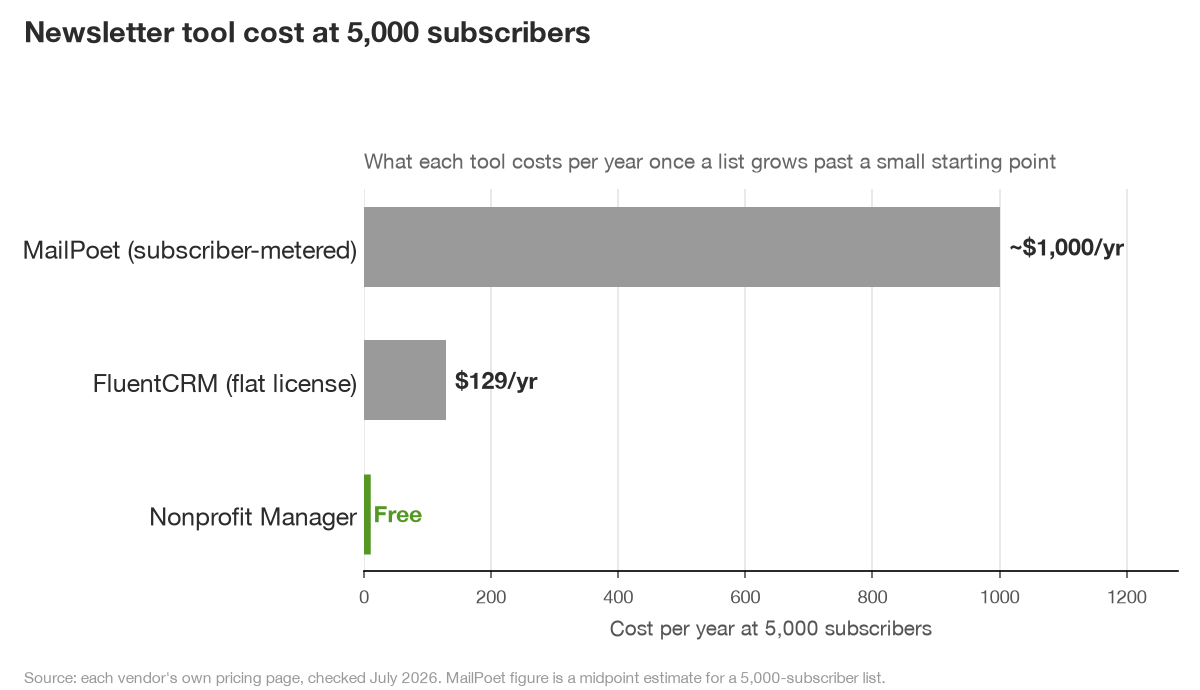
Run the math on a newsletter that actually works. A nonprofit that grows its list from 500 to 5,000 subscribers over three years is a reasonable outcome for an organization actively building its audience. Along the way, it would move through several MailPoet pricing tiers. By 5,000 subscribers, that’s commonly $75 to $100 a month on most subscriber-metered platforms. That’s roughly $1,000 a year for the exact same newsletter Nonprofit Manager sends for free. The tools reward you for not growing, which is a strange incentive for a nonprofit trying to build a donor base.
The options
Nonprofit Manager, best free with no subscriber limit
Write and send newsletters in the same block editor you use for pages, with open and click tracking, a CAN-SPAM compliant footer, and subscriber-chosen instant or weekly-digest delivery. Subscribers manage their own preferences through a self-service page, so you’re not manually processing unsubscribe requests by email. Free, no per-subscriber fee. Pro unlocks five dedicated sending services (Amazon SES, Brevo, SendGrid, Mailgun, and Postmark) on top of the free WordPress default and custom SMTP, plus automated emails triggered by member and donor actions. Here’s how it works.
MailPoet, good for a smaller growing list
Free up to 500 subscribers, then a paid Business plan around $10 a month that climbs as your list grows past that. It’s tightly built for WooCommerce and general marketing emails, with a drag-and-drop designer that’s genuinely easy to use. Starting small and want a polished, well-known tool, and comfortable paying once your list takes off? Fair choice. Nonprofit Manager compared to MailPoet.
FluentCRM, best for deep automation
A self-hosted email automation and CRM plugin, $129 a year, no per-subscriber fee of its own. Built for marketers who want detailed funnels and segmentation, multi-step automations, and lead scoring. That depth is the point and also the tradeoff. It takes real time to learn the funnel builder, time a volunteer-run nonprofit newsletter often doesn’t have to spend. Nonprofit Manager compared to FluentCRM.
What actually belongs in a nonprofit newsletter
The tool matters less than what you put in it. A monthly nonprofit newsletter that keeps people opening it usually mixes three things. One concrete story about someone your organization helped. A short update on a program or project in progress. And one clear ask, whether that’s a specific dollar goal, an upcoming event, or a volunteer shift that needs filling. Skip the newsletter that’s only a list of everything that happened that month. It reads like a status report, not something a donor wants to open.
Cadence matters more than most nonprofits assume. Monthly is the most common rhythm and it works, but consistency beats frequency. A newsletter that goes out reliably on the first Tuesday of every month builds a habit in your reader’s inbox. One that goes out whenever someone finds time gets deleted unread more often, because the reader hasn’t learned to expect it. Nonprofit Manager’s weekly-digest option exists for exactly this gap. Say you’re also sending occasional single updates, an urgent appeal or an event reminder. Subscribers who’d rather get one weekly roundup than four separate emails can choose that instead of unsubscribing from everything.
Why deliverability matters more than the sending tool
Any of these plugins can compose and queue a newsletter. What actually determines whether it lands in an inbox instead of a spam folder is the sending infrastructure behind it, not the editor you wrote it in. WordPress’s default mail function routes through your web host’s shared mail server, which inboxes increasingly distrust because so much spam also comes from shared hosting.
That’s why a real newsletter setup, on Nonprofit Manager or anywhere else, eventually needs a dedicated sending service. Amazon SES, SendGrid, or Postmark, authenticated with your own domain’s SPF and DKIM records, all work. The manual DNS work is the part that usually stalls people out, so Nonprofit Manager Pro’s setup wizard walks through connecting one of five providers in a few minutes instead.
Switching from Mailchimp or Constant Contact
Both let you export your subscriber list as a CSV, including custom fields and tags, from their audience or contacts settings. Nonprofit Manager’s import wizard connects to the Mailchimp API directly, or accepts a CSV from Constant Contact, and maps fields automatically. Bring subscriber consent status along too. Anyone who unsubscribed on the old platform should be imported as unsubscribed, not re-added fresh, so you don’t accidentally re-email someone who opted out.
Send your first newsletter from Nonprofit Manager to a small test segment before switching your whole list over. That catches formatting issues and confirms your new sending domain is authenticated correctly, before it matters on a real send.
Growing the list you’re sending to
A newsletter tool only matters once there’s a list worth sending to. The most reliable way small nonprofits grow one is asking at every point of contact, not just a form buried on a contact page. Add a signup checkbox to your donation form and your event registration, since someone who just gave money or signed up to attend is already telling you they’re interested. Nonprofit Manager’s built-in signup block can go in a page footer, a sidebar, or inside a post, and it writes straight to the same subscriber list your newsletter sends to, no separate service to sync.
Resist the urge to buy or scrape a list from somewhere else. Beyond the legal exposure under CAN-SPAM and, for supporters in the EU, GDPR, a purchased list also tanks the open rates and spam-complaint rates that determine whether your future emails reach anyone at all. A smaller list of people who actually asked to hear from you outperforms a large one that didn’t.
Our pick for the best newsletter plugin for nonprofits
For a small nonprofit, Nonprofit Manager wins on price and simplicity. Your newsletter, your members, and your donors live in one free system with no subscriber meter. Need deep marketing automation and willing to pay for it? FluentCRM goes further. See it as part of the all-in-one plugin for small nonprofits.
Compare by category
See how Nonprofit Manager stacks up in other areas:
- Best WordPress plugin for donations
- Best membership plugin for nonprofits
- Best WordPress plugin for nonprofits
- Best WordPress plugin for churches
- Best plugin for clubs and associations
Frequently asked questions
Does Nonprofit Manager charge based on my subscriber count?
No. The newsletter feature is free with no per-subscriber fee, unlike tools such as MailPoet that start charging once your list passes a certain size.
Can I send a newsletter from WordPress without Mailchimp?
Yes. Nonprofit Manager sends newsletters directly from your WordPress site using the block editor, with tracking and a compliant unsubscribe link built in.
What happens as my newsletter list grows?
Nothing changes on price. As your list grows, you’ll likely want a dedicated sending service so emails land in inboxes reliably. Nonprofit Manager Pro unlocks five provider options and a setup wizard for that.
Can I import my list from Mailchimp or Constant Contact?
Yes. The import wizard connects to the Mailchimp API directly or accepts a Constant Contact CSV export. It carries over unsubscribe status too, so you don’t re-email someone who opted out.
Does Nonprofit Manager support a weekly digest instead of instant emails?
Yes. Each subscriber chooses instant delivery or a weekly digest from their own preferences page, so people who want fewer emails aren’t stuck unsubscribing entirely.
Do I need a dedicated sending service like SendGrid or Amazon SES?
For anything beyond a very small list, yes. WordPress’s default mail function routes through shared hosting infrastructure that inboxes increasingly flag as spam. Nonprofit Manager Pro’s setup wizard connects one of five dedicated providers in a few minutes.
Prices are from each vendor’s official pages as of July 2026 and can change.